Castle Game Engine
← Users Developers →
 
Intro
 
News
 
view3dscene
 
The Castle
 
All Programs
 
Forum
 
Donate
 
Engine
 
VRML/X3D
 
Blender
 
Castle Game Engine icon

Castle Game Engine
Downloads and docs for developers
(version 3.0.0)

Fountain water
multiple_viewports: interactive scene, with shadows and mirror
castle_siege model from DeleD sample models, with shadows
Precomputed Radiance Transfer
Demo of three ScreenEffects defined in VRML/X3D, see screen_effects.x3dv
Close up shadows on the tree. Notice that leaves (modeled by alpha-test texture) also cast correct shadows.
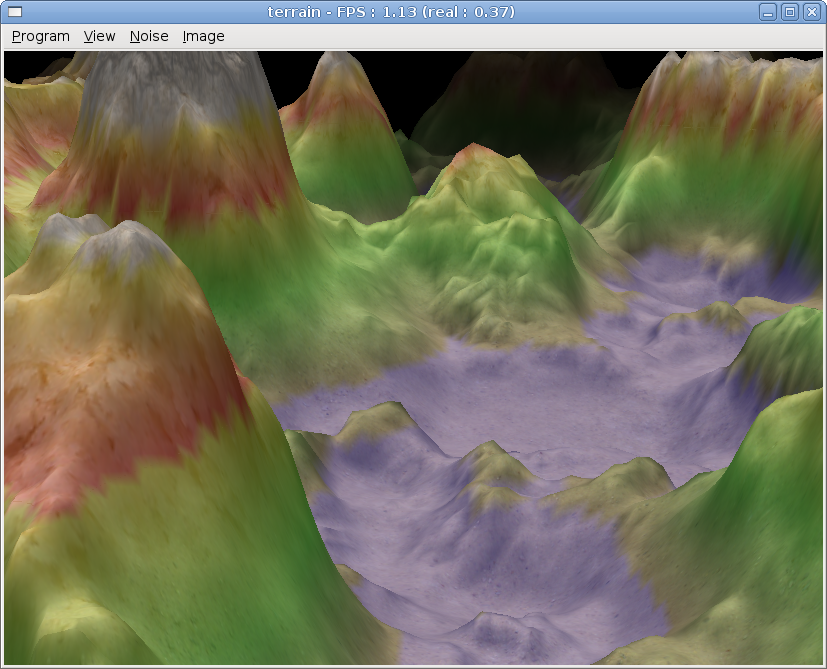
Terrain 1
Water reflections by optimized GeneratedCubeMapTexture
Fog from 3D noise

Contents:

1. Introduction

This is a free/open-source (LGPL / GPL) 3D game engine. In short:

  • Our main 3D scene format is VRML / X3D, which is an open standard (you'll find you can export to it from virtually any 3D modeler), and a lot of our strength comes from it (it's a 3D scene format that can also express interactive world features, scripting etc.). Even if you don't know VRML/X3D, the whole engine is designed as a general-purpose 3D engine, and other 3D model formats are supported as well (Collada, Wavefront, MD3 and others).

  • We have a lot of 3D graphic features. Shaders, shadows, bump mapping, mirrors, custom viewports, screen-space effects, and much more. Just look at the screenshots on this page :)

  • The engine is developed for the Free Pascal Compiler, an open-source cross-platform compiler, and the engine is cross-platform as well (Linux, Mac OS X, Windows, and more). We have Lazarus components for RAD development, although the core engine doesn't depend on Lazarus LCL and you can develop full games with pure FPC (we have our own OpenGL window management unit, if you want). The whole engine is 100% clean Object Pascal code.

The features section below on this page contains more exhaustive list of engine features, with links to detailed information.

See also demo movies of Castle Game Engine.

2. Download

2.1. Engine

Download "Castle Game Engine" (version 3.0.0)

This archive contains the whole engine sources. There are many simple example programs included (see examples/ subdirectory). Compile everything with simple "make" inside the castle_game_engine/ directory. Compile examples by simple "make examples". Or you can compile and run from Lazarus.

For more details about trying out the examples, compiling and generally using the engine see the "Introduction" page in our reference.

An important strength of our engine is that you can express a lot of stuff inside your data, that is inside VRML/X3D models. So many features of our engine (shaders, screen effects, mirrors and many many more) don't have any special ObjectPascal examples, because they are simply not needed. For simple uses, you just define what you need inside VRML/X3D file (of course, for advanced usage you can do a lot more with ObjectPascal code, and you can always build/modify VRML/X3D graph by ObjectPascal code). So be sure to grab our demo VRML/X3D models and try opening them with any engine example program (like scene_manager_basic.lpr, or even our view3dscene) — you will find that everything just works, not requiring a single line of ObjectPascal code.

Under Windows you will need some DLLs to successfully run some of the programs. I collected all DLLs needed by my programs in this archive (622 KB), so just download this and put in program's exe directory (or somewhere on $PATH). These DLLs are already included in binary archives of my programs, but are not included in source archives (since they are only usable for Windows users). In general, for all OSes, see section "Requirements" in the documentation of programs and make sure that you have appropriate libraries installed on your system.

Alternatively, you can get the latest (bleeding-edge) sources from Subversion by:

svn checkout http://svn.code.sf.net/p/castle-engine/code/trunk/castle_game_engine

2.2. Other programs' sources

Below are sources for specific programs. Each of them contains program-specific modules, main program file and script compile.sh to simply compile whole program using FPC. Download those that you are interested in and unpack them into the same directory where you unpacked the core engine sources. Then execute compile.sh scripts to compile the programs you want.

  • sources of view3dscene
    These tar.gz sources are compatible with latest engine 3.0.0 version.

    Download from Subversion by:

    svn checkout http://svn.code.sf.net/p/castle-engine/code/trunk/view3dscene
  • sources of castle
    These tar.gz sources are compatible with latest engine 3.0.0 version.

    Download from Subversion by:

    svn checkout http://svn.code.sf.net/p/castle-engine/code/trunk/castle
  • sources of rayhunter
    These tar.gz sources are compatible with latest engine 3.0.0 version.

    Download from Subversion by:

    svn checkout http://svn.code.sf.net/p/castle-engine/code/trunk/rayhunter
  • sources of lets_take_a_walk
    These tar.gz sources are compatible with latest engine 3.0.0 version.

    Download from Subversion by:

    svn checkout http://svn.code.sf.net/p/castle-engine/code/trunk/lets_take_a_walk
  • sources of malfunction
    These tar.gz sources are compatible with latest engine 3.0.0 version.

    Download from Subversion by:

    svn checkout http://svn.code.sf.net/p/castle-engine/code/trunk/malfunction
  • sources of kambi_lines
    These tar.gz sources are compatible with latest engine 3.0.0 version.

    Download from Subversion by:

    svn checkout http://svn.code.sf.net/p/castle-engine/code/trunk/kambi_lines
  • sources of glplotter
    These tar.gz sources are compatible with latest engine 3.0.0 version.

    Download from Subversion by:

    svn checkout http://svn.code.sf.net/p/castle-engine/code/trunk/glplotter
  • sources of gen_function
    These tar.gz sources are compatible with latest engine 3.0.0 version.

    Download from Subversion by:

    svn checkout http://svn.code.sf.net/p/castle-engine/code/trunk/gen_function
  • sources of glViewImage
    These tar.gz sources are compatible with latest engine 3.0.0 version.

    Download from Subversion by:

    svn checkout http://svn.code.sf.net/p/castle-engine/code/trunk/glviewimage
  • sources of bezier_curves
    These tar.gz sources are compatible with latest engine 3.0.0 version.

    Download from Subversion by:

    svn checkout http://svn.code.sf.net/p/castle-engine/code/trunk/bezier_curves
  • sources of glinformation and glinformation_glut
    These tar.gz sources are compatible with latest engine 3.0.0 version.

    Download from Subversion by:

    svn checkout http://svn.code.sf.net/p/castle-engine/code/trunk/glinformation

Note: archives above do not contain user documentation for these programs. For now you can just go to the page of appropriate program and read documentation there (if you downloaded binary version of program you will also have documentation there).

2.3. FPC (Free Pascal Compiler) versions

You need the Free Pascal Compiler (FPC) to use our engine. You may also find it comfortable to use Lazarus, which is an IDE (editor, debugger etc.) built around FPC.

We always support and advice the latest stable release of FPC (currently 2.6.0)..

Note only for FPC 2.6.0: if you use compile.sh scripts, you need to fix them: use ${CASTLE_FPC_OPTIONS:-} instead of "${CASTLE_FPC_OPTIONS:-}" (strip double quotes, to avoid FPC #21000 bug). This isn't a problem for earlier FPC versions, or if you compile programs with Lazarus.

We also support a couple of older FPC releases. Currently FPC versions >= 2.2.4 are supported.

2.4. Getting bleeding-edge (development) version from Subversion (SVN)

You can get all the sources from our Subversion repository. If you don't know about Subversion, see Subversion main site and the excellent book about the Subversion.

To download full sources for all projects, do

svn checkout http://svn.code.sf.net/p/castle-engine/code/trunk/

Please note that the full trunk is quite large. It contains everything: the core engine sources (castle_game_engine subdirectory), webpages stuff (in www subdirectory), view3dscene sources, castle sources etc. Often you want to download only specific subdirectories of it.

You can also browse the SVN repository.

Code from SVN is always the bleeding-edge current version of the work. That said, usually it's quite stable (I have a personal policy to try to commit only code that is compileable and somewhat tested). So feel free to peek, and please report eventual bugs you spot. You can also download the code from one of http://svn.code.sf.net/p/castle-engine/code/tags/ subdirectories, these contain frozen code from specific versions of my programs, so should be 100% stable.

3. Features

Exhaustive list of our engine features:

  • Optimized OpenGL rendering of models in X3D, VRML 2.0 (97) and VRML 1.0 formats. Including support for advanced VRML/X3D features like prototypes and events (user can interact with the 3D world).
  • Collada, 3DS, MD3, Wavefront OBJ file formats are also supported. They are internally converted into the VRML/X3D nodes graph, which means that they get all the optimizations for rendering, and 3D content from all file formats can be mixed (for 3D editing tools and such).
  • Saving the current state of VRML/X3D node graph to standardized XML and classic encodings. You can even use it to make your own 3D modeller on top of our engine. Various conversions between 3D model formats and limited editing capabilities are provided out-of-the-box by our tools.
  • Animations are supported, in two flavors: interactive animation interpolated at runtime, or precalculated animation for fast playback.
  • Octrees are used for various collision detection tasks. For dynamic scenes, a hierarchy of octrees is used, allowing accurate and fast collision detection even when the scene constantly changes.
  • Scene manager for centralized 3D world handling, with custom viewports possible.
  • Shadows by both shadow volumes (full implementation, with z-fail / z-pass switching, silhouette detection etc.) and shadow maps. Our shadow maps are very comfortable to use, and shadows from multiple light sources are correctly rendered. We also have experimental Variance Shadow Maps implementation.
  • Bump mapping is trivially easy to use. Various algorithms are available: from the classic bump mapping (take normal from the texture), through the parallax bump mapping, up to the steep parallax bump mapping with self-shadowing.
  • Shaders:
    • We have classes to easily use GLSL shaders. But usually you don't need to use them, because...
    • You can design and control GLSL shaders inside VRML/X3D. So GLSL shaders are fully available for model designers, programmer doesn't have to do anything.
    • We have developed special extensions to composite shader effects, to enable custom GLSL effects cooperate with each other and with built-in shader effects.
    • We fully support rendering both in fixed-function and programmable pipelines. In the latter case, the whole shading is expressed through GLSL shaders (that you can override with ComposedShader or exhance with Effect, see links above).
  • Screen-space effects in GLSL are very easy to create (see ScreenEffect docs).
  • Advanced texturing, following X3D standard: multi-texturing, cube map texturing (can be loaded from separate files, DDS files, or captured during runtime), 3D textures, S3TC compressed textures, anisotropic filtering.
  • Speeding up rendering by hardware occlusion query, a simple approach and more involved Coherent Hierarchical Culling.
  • CastleWindow unit is available to easily create windows with OpenGL context. The intention of this unit is to be something like glut, but magnitudes better — using clean ObjectPascal, for start. Also it allows you to easily create menu bars, open/save file and similar dialogs that are implemented using native controls (GTK 2 or WinAPI).
  • Reading and writing of images in various formats, processing them and using as OpenGL textures. Besides many common image formats (png, jpg, ppm, bmp, just for starters), included is also support for DDS (textures with compression, mipmaps, 3d, cube maps) and RGBE format (Radiance HDR format).
  • Handling of fonts, including rendering them with OpenGL, as bitmap or outline (3D) fonts.
  • Comfortable 3D sound engine, using OpenAL, with intelligent sound source management, supporting WAV and OggVorbis formats. Includes VRML/X3D integration ("Sound" component of X3D specification), so content creators can define sound sources themselves.
  • Basic 2D controls rendered through OpenGL (buttons, panels, tooltips, menus etc.) are available. Good for games, where making a custom-looking GUI (that fits with your game theme) is important.
  • Anti-aliasing (initializing OpenGL multi-sampling) is covered.
  • Simple ray-tracer is implemented (see the gallery).
  • Playing movie files. This includes loading and saving as image sequence or "real" movie files (ffmpeg is needed to encode / decode movie files). While the implementation is limited to a small movies for now (as memory consumption is large), it's perfect for flame or smoke animation in games. We even have a simple movie editor as an example program in engine sources.
  • The engine is portable. Currently tested and used on Linux, FreeBSD, Mac OS X and Windows (all i386), and Linux on x86_64. Porters/testers for other OS/processors are welcome, the engine should be able to run on all modern OSes supported by FPC.
  • There are many example programs, look in sources castle_game_engine/examples/ subdirectory.
  • There are ready window classes (TCastleWindow) and Lazarus components (TCastleControl) to make simple VRML/X3D and other 3D models browser, on a Lazarus form or independent from Lazarus LCL. The engine is integrated with Lazarus — we have various Lazarus components.
  • Engine components are independent when possible. For example, you can only take model loading and processing code, and write the rendering yourself. Or you can use our OpenGL rendering, but still initialize OpenGL context yourself (no requirement to do it by our CastleWindow unit). And so on. Of course, ultimately you can just use everything from our engine, nicely integrated — but the point is that you don't have to.

The engine was used to develop all programs on these pages. It should be compiled by FreePascal.

4. Documentation

5. License

The whole engine and all related programs' sources are licensed on terms of GNU General Public License. See www.gnu.org for more information about this license (including translations of it to various languages) and philosophy of free software.

Moreover, the core of the engine is also alternatively available under the more permissive GNU Lesser General Public License with the so-called "static linking exception". The idea of this exception is to allow statically linking with the engine on the same terms as dynamically linking. (Static linking is what normally happens when you compile a program using my units, without wrapping them in a DLL / Delphi runtime package.)

All this basically means that you have to share your modifications to the engine, and you can use the engine in closed-source programs.

The precise legal text of the "static linking exception" follows (it's the same as used by FreePascal Runtime Library and many other projects):

As a special exception, the copyright holders of this library give you permission to link this library with independent modules to produce an executable, regardless of the license terms of these independent modules, and to copy and distribute the resulting executable under terms of your choice, provided that you also meet, for each linked independent module, the terms and conditions of the license of that module. An independent module is a module which is not derived from or based on this library. If you modify this library, you may extend this exception to your version of the library, but you are not obligated to do so. If you do not wish to do so, delete this exception statement from your version.

Important notes:

  • If you want to use the engine on LGPL terms (as opposed to more strict GPL) you must compile the engine with CASTLE_ENGINE_LGPL symbol defined in file castle_game_engine/base/castleconf.inc. Just put there {$define CASTLE_ENGINE_LGPL} line (or simply remove the beginning space in already prepared comment { $define CASTLE_ENGINE_LGPL}).

    This is necessary to avoid pulling in GPL-only dependencies. For now, this is only the NURBS unit (uses GPL-only code from White_dune). This missing NURBS implementation is the only difference between LGPL and "strict GPL" engine version.

  • Note that LGPL stuff concerns only the engine, i.e. things inside castle_game_engine archive. The rest of the programs (view3dscene, castle etc.) are still strict GPL.

6. Automatic tests

test_castle_game_engine

I'm managing a suite of automatic tests, in the spirit of Extreme Programming. On 2005-04-25 I converted my tests to use fpcunit (this is a close FPC analogy to JUnit for Java) and it's Lazarus GUI runner.

The tests are included in the engine sources, see the subdirectory tests/. You can open and run them from Lazarus to see a result in a nice GUI window.

You can also compile and run a console version, that doesn't require Lazarus (LCL), only pure FPC is needed:

cd tests/
./compile_console.sh
./test_castle_game_engine -a